
Frequently Asked Questions
Your Questions Answered: Discover How Sibio's CKM Can Transform Your Life
1. What is the SiBio CKM?
The SiBio KS1 CKM is a wearable wellness device that helps users track ketone level trends over time. It supports individuals following low-carb, fasting, or ketogenic lifestyles who want to visualize how their body responds during nutritional states.
2. Is this a medical device?
No. The CKM is not a medical device and is not FDA-approved. It is not intended to diagnose, treat, cure, or prevent any disease or condition.
3. Can this be used to manage medical conditions like diabetes?
Absolutely not. This device is not intended for medical use in any capacity. Never use this device to make decisions about health conditions such as diabetes or ketoacidosis. Always consult a licensed physician.
4. Are you affiliated with SiBio?
No. CK Monitors is an independent U.S. distributor of the SiBio KS1 CKM. We are not affiliated with or endorsed by SiBio Technology Ltd. We simply provide access to the product for customers in regions where SiBio does not ship directly.
5. How long does the sensor last?
The CKM sensor typically lasts up to 14 days once applied.
6. Is this FDA approved?
No. This product is not FDA approved and is not a medical device.
7. Can this be used for diabetes & medical conditions?
No. This device is not intended for medical use.
8. Does it need calibration?
No. The device is factory calibrated and ready for use with the mobile app.
9. What phones is the app compatible with?
It supports most modern iOS and Android devices.
10. Is it waterproof?
Yes, the sensor is IPX8 rated waterproof, meaning it can tolerate water exposure from everyday activities.
11. Can I return the product?
We only accept unopened and unused items within 14 days of delivery. Returns must be requested in advance and approved. Shipping fees are not refundable.
12. Is there a warranty?
No. There are no warranties expressed or implied. The device is sold as-is, for informational and lifestyle use only, and you accept full responsibility for its use upon purchase.
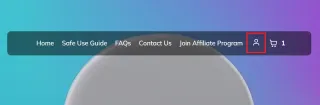
How to cancel my subscription to CK Monitors (Step 1)
Click on the account icon on the main page of the website
(Step 2)
Enter the email that you used on your order and wait for the verification email to enter your code (this may take a few minutes and make sure to check spam folder).
(Step 3)
Once logged in go to your account icon and click on Manage Subscriptions. On the client portal click on Log in with a security code. Enter the email that you used on your order and wait for the verification email to enter your code.
(Step 4)
Now once logged in to the client portal. Go to billing and subscriptions and click on generate security code. Enter the code once received on your email.
(If you dont land on the Billing and subscriptions page directly, click on your account icon top right and go to profile settings then go to Billing and subscriptions.)
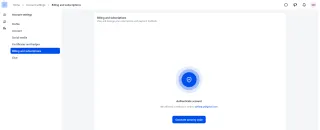
(Step 5)
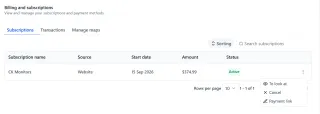
Click on the 3 dots next to your subscription then select cancel and you will cancel your CK Monitors monthly subscription.
Still have questions?
📧 Email: [email protected]
📞 Phone: +12525842256
CK Monitors, 6 E Benton St, Iowa City, IA 52240
© 2026 CKMonitors– 6 E Benton St, Iowa City, IA 52240
This product is not approved by the U.S. FDA and is not a medical device. It is intended for general wellness and lifestyle tracking purposes only and is not intended to diagnose, treat, cure, or prevent any disease.